Documentation Audioguide > Android English > Install
Documentation Audioguide
Install
For an optimal experience, we recommend installing the audio guide on your phone the day before your session by following the steps below. An internet connection is only required for the initial launch. Once launched, the audio guide functions offline.
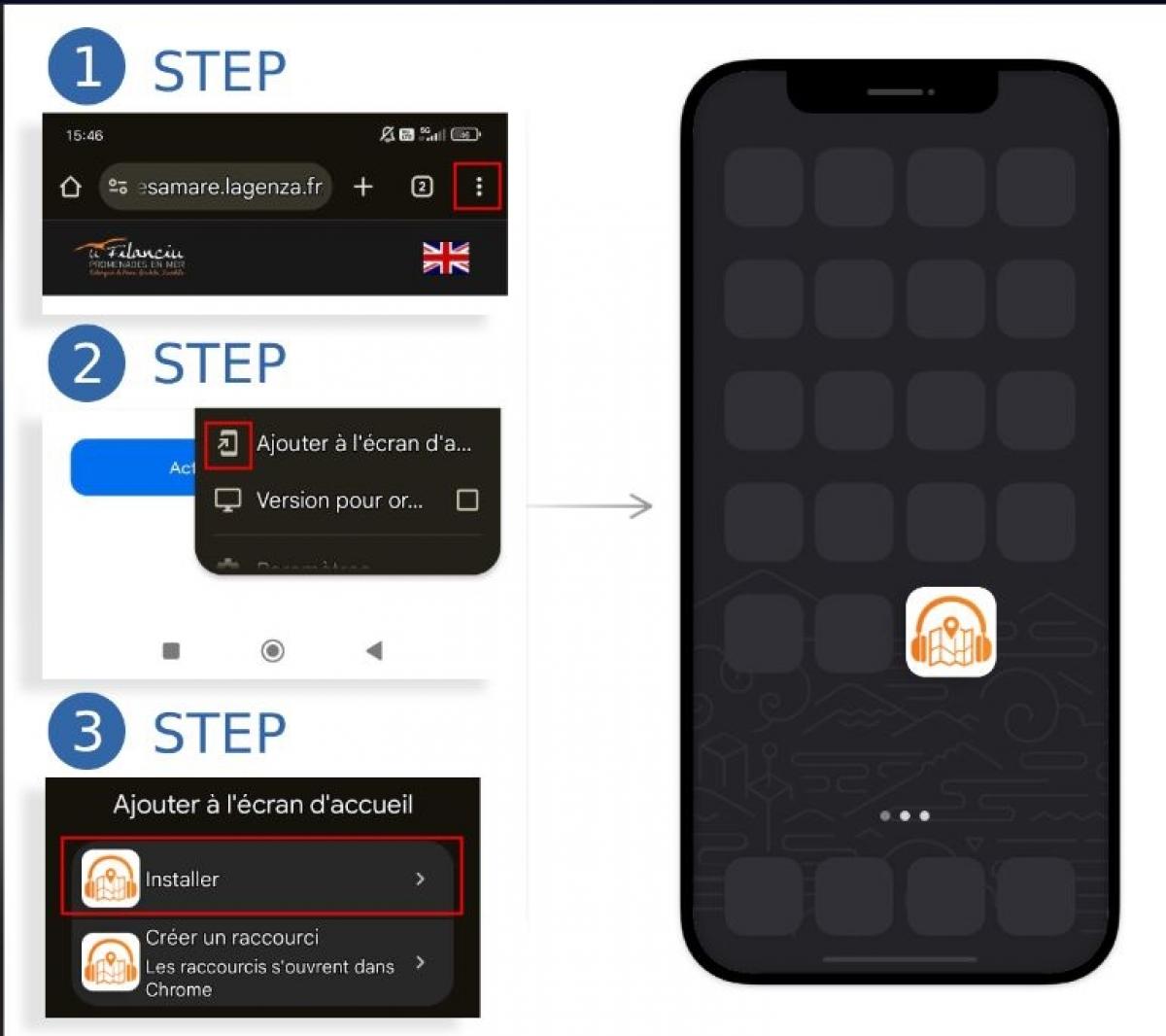
1. Open the audioguide link
Click on the link provided by the organizer in your confirmation message.
2. Tap the three-dot menu (top right)
Once the page has loaded, tap the menu icon (⁝) in the top-right corner of your Chrome browser.
3. Select “Install app”
From the dropdown menu, tap on “Add to Home screen” (the wording may vary slightly depending on your Android version).
4. Confirm installation
When prompted by the system, confirm that you want to install the app.
5. Access the app from your home screen
The audioguide will now appear as an app on your home screen. You’ll be able to open it directly when your session starts.
Tip
We recommend installing the audioguide the day before your activity, when you have a stable internet connection.
An internet connection is only needed the first time you launch the audioguide.
Once it’s started, it will work without an internet connection for the rest of your session.